Roblox Script Guide: Features, Games & Updates 2026
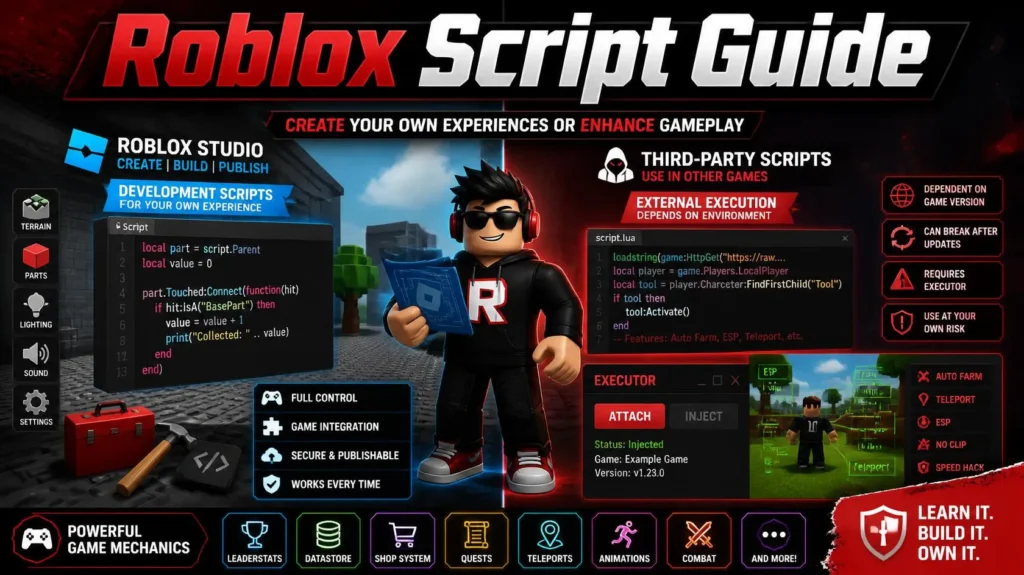
Roblox has become a huge gaming platform with thousands of experiences, and scripting plays an important role in how many of them work. A Roblox script can refer to code created by developers in Roblox Studio or third-party scripts designed for specific games and environments. For players searching for Roblox scripts, it is important to understand how they work, what types are available, what features they offer, and why compatibility can change after an update. This guide covers the basics of Roblox scripting, common script types, popular features, compatibility, troubleshooting, and safety tips.
Roblox Script Guide
A Roblox Script is a set of instructions that tells the game environment what to do, including managing characters, objects, events, items, interfaces, and gameplay mechanics. Roblox development mainly uses Lua-based scripting to create interactive systems, tools, events, and other game features. How a script works depends on where it is used. Roblox Studio scripts work within a developer’s own experience, while third-party scripts may depend on an external execution environment and game version. The term “Roblox Script” can refer to both Roblox Studio development scripts and third-party game scripts, so understanding the difference helps readers find the right information.
How to Choose a Roblox Script
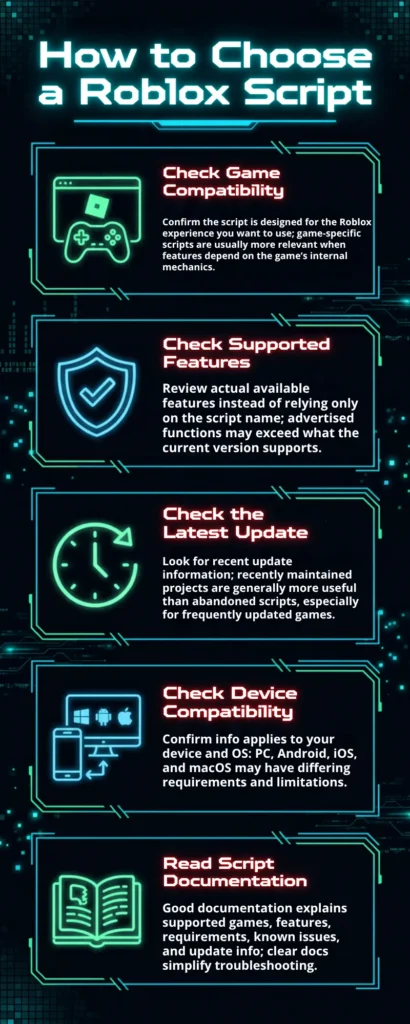
Choosing a script should involve more than looking at the number of advertised features.
Check Game Compatibility
First, confirm that the script is designed for the Roblox experience you want to use. A game-specific script is usually more relevant when its features depend on the game’s internal mechanics.
Check Supported Features
Check the actual features available instead of relying only on the script’s name. A script may advertise many functions while only supporting a smaller selection in its current version.
Check the Latest Update
Always look for recent update information before using a script. A recently maintained project is generally more useful than an abandoned script, especially for games that receive frequent updates.
Check Device Compatibility
Confirm that the information applies to your device and operating system before using a script. PC, Android, iOS, and macOS can have different requirements and limitations.
Read Script Documentation
Good documentation should explain supported games, features, requirements, known issues, and update information. Clear documentation can also make troubleshooting considerably easier.
Types of Roblox Script
There are many different categories of scripts, and their purpose can vary considerably from one game to another.
Game-Specific Scripts
Game-specific Roblox Scripts are designed around the mechanics and systems of a particular Roblox experience, such as collecting resources in a farming game or managing quests, movement, and items in an adventure game. Since each game works differently, these scripts may require regular updates to remain compatible when the game’s systems or mechanics change.
Automation Scripts
Automation Scripts are designed to handle repetitive actions such as collecting resources, completing recurring tasks, or managing routine activities. These features are especially common in games where players need to repeat the same actions regularly to make progress.
Utility Scripts
Utility scripts generally focus on convenience or additional tools. Examples can include:
- Teleport utilities
- Movement tools
- Item-location tools
- Interface controls
- Player information
- Configuration options
The available functions depend on the individual script and the game it targets.
Visual and Information Scripts
Some Roblox Scripts focus on displaying extra information through visual interfaces, such as player indicators, item details, location markers, and other on-screen elements. These features are often referred to as ESP or item finder, but their exact functionality can vary depending on the script.
Script Hub
A Roblox Script Hub brings multiple script functions and game-specific options together in one interface, making it easier to access different games and features in one place. Since script hubs can vary in quality and compatibility, users should check the supported games, features, and current versions before using them.
Popular Roblox Script Features
| Feature | Description |
| Auto Farm | Automates repetitive farming activities in supported Roblox games, such as collecting resources, completing repeated tasks, or managing routine activities. |
| Auto Collect | Helps automate repetitive item or resource collection, depending on the game mechanics and supported script version. |
| Auto Harvest | Automates repetitive harvesting tasks in farming and garden-style Roblox experiences, making it easier to manage and collect resources. |
| Auto Sell | Automates the selling of collected items for in-game currency or rewards in supported Roblox games. |
| Auto Buy | Helps automate repetitive purchasing actions, with availability depending on the game’s purchasing system. |
| Teleport | Allows movement between supported locations or points within a Roblox game, depending on the script and game map. |
| ESP | Provides visual features that highlight or identify players, objects, items, or other elements in a Roblox game. |
| Item Finder | Helps locate specific items or resources within supported Roblox games, which can be useful on large maps. |
| AFK Functions | Helps maintain certain repetitive activities while players are away from their device, with behavior varying between games. |
| Movement Features | Provides additional movement controls, such as speed options, jumping functions, or flight-style movement, depending on the game and script. |
Roblox Script for Popular Games
The popularity of Roblox Scripts often follows the popularity of the games themselves. Game-specific searches can help users find information about supported scripts and available features. Different Roblox experiences may have different script options based on their gameplay and systems. Checking the game and script details can help users find more relevant and up-to-date information.
Blox Fruits Script
Blox Fruits is one of the Roblox experiences frequently associated with script searches. Scripts for the game may focus on farming, quests, movement, item discovery, and other game-specific functions. Since Blox Fruits receives regular updates, script features and compatibility can change over time. Users should check current compatibility before relying on an older Blox Fruits script.
Grow a Garden Script
Grow a Garden focuses on planting, growing, harvesting, pets, and resource management. Scripts for the game commonly include features such as auto farming, planting, harvesting, collecting, and selling. These options are mainly designed around repetitive activities within the game. Available features can vary depending on the script version and current game updates.
Fisch Script
Fisch is centered around fishing and collecting resources within the game. Game-specific Fisch scripts may focus on fishing automation, item management, movement, and other supported features. Available functions can vary between different scripts and versions. Users should check which features are currently supported before using a script with the game.

Steal a Brainrot Script
Steal a Brainrot has generated significant interest in game-specific Roblox scripts. Depending on the current version, scripts may include automation, movement, item-related functions, and visual information tools. Available features can vary between different scripts and game updates. Users should check the current version to understand which functions are supported.
Rivals Script
Rivals is a competitive Roblox experience, so script searches often focus on aiming, player information, movement, and other gameplay-related functions. Different Rivals Scripts may offer different features depending on the game and script version. Competitive games can change frequently through updates and other changes. Because of this, checking compatibility and the current version information is especially important.

Other Popular Roblox Game Scripts
The Roblox platform contains thousands of experiences, and new games can become popular very quickly. Other popular script searches may include Blade Ball, Murder Mystery 2, Pet Simulator, and anime-based Roblox experiences. They can also include Brookhaven, Arsenal, Doors, and Evade. When researching a game-specific script guide, always verify that the information applies to the current version of the experience.
Roblox Script Compatibility
Compatibility is one of the most important factors when using third-party Roblox scripts. A script that worked previously may stop functioning when Roblox, the game, or the script-execution environment changes.
Game Compatibility
Every Roblox experience can have its own mechanics, interfaces, objects, and systems, so a script made for one game may not work with another. Before using a script, check whether the intended game is specifically supported.
Roblox Version Compatibility
Roblox regularly receives updates that can change how different systems behave and affect third-party scripts or tools. When this happens, scripts may need updates to remain compatible, making current version information important.
Script Version and Updates
An outdated script may have missing features, errors, or compatibility problems that affect how it works. When researching a script, check its latest update and supported game version instead of assuming an older release still works.
PC and Mobile Compatibility
Scripts and related tools may behave differently across Windows, macOS, Android, and iOS devices. Differences in controls, operating systems, performance, and available environments can all affect compatibility.
Why Scripts Stop Working After Updates
There are several possible reasons:
- Roblox changed an underlying system
- The game received a major update
- The script was designed for an older version
- A required function changed
- The external execution environment changed
- A feature was removed or redesigned
When this happens, waiting for a compatible update is often more useful than repeatedly trying an outdated version.
Roblox Scripts on Different Devices
Device compatibility is an important consideration when researching Roblox Scripts across different platforms. Windows commonly uses keyboard and mouse controls, while macOS may have different requirements based on the operating system and scripting environment. Android devices can vary in hardware and performance, while iOS has its own platform restrictions that may limit some scripting methods. The Roblox Script experience can also differ between mobile and PC because of control differences, so mobile users should check device compatibility first.
Common Roblox Script Problems
Even when a script appears compatible, users can encounter problems after updates or configuration changes.
Roblox Script Not Working
If a Roblox Script does not work, first check whether the game or Roblox platform has recently been updated. Other possible causes include an outdated script, incorrect configuration, or device compatibility issues.
Script Stops Working After a Roblox Update
A Roblox update can change systems that a third-party script depends on, which may cause it to stop working. If the script worked before the update, check whether a newer compatible version is available.
Script Features Not Loading
Sometimes the main script loads while individual features fail to work properly. This can happen when certain functions are outdated, unsupported by the current game version, or dependent on changed systems.
Script Causes Lag or Performance Issues
Scripts with frequent automation or visual processing can use additional system resources and affect performance. If lag occurs, try disabling unnecessary features and check whether the issue is specific to that script.
Script Is Not Compatible With the Game
A script may be designed for a different Roblox experience or an older version of the same game. Before troubleshooting further, compare the script’s supported game and version information.
Roblox Script Hub
A Roblox Script Hub brings multiple scripts, tools, or game-specific features together through a single interface. It provides a centralized way to browse different options instead of searching for separate tools for each supported game. The exact design and available features can vary from one hub to another. A hub may include different scripts and functions based on the games it supports.
Script Hub vs Individual Script
An individual script usually focuses on one game or a specific group of functions. A Script Hub may include multiple games and features through a single interface. This can make it easier to organize different script options in one place. For users who explore different Roblox experiences, a hub can make finding available script options more convenient.
Benefits of a Script Hub
Potential benefits include:
- Multiple game options in one place
- Centralized feature selection
- Easier organization
- Updates for several supported games
- A single interface for supported functions
However, quality and reliability vary, so the source and current update status should always be considered.
Frequently Asked Questions About Roblox Script
What is a Roblox script?
A Roblox script is code used to perform programmed actions within the Roblox ecosystem. In development, Roblox scripts are commonly written in Lua and can be used to create gameplay systems, interactive features, and other in-game mechanics.
Are Roblox Scripts Game-Specific?
Many third-party Roblox scripts are game-specific because they depend on the mechanics and systems of a particular Roblox experience. A script created for one game should not automatically be expected to work with another game.
Can Roblox Scripts Work on Mobile?
Roblox Script compatibility on mobile depends on the script, device, operating system, and execution environment. A solution designed for PC should not automatically be expected to work on Android or iOS.
Why Does a Roblox Script Stop Working?
A Roblox script can stop working due to Roblox updates, game updates, outdated script versions, or changed dependencies. Compatibility issues can also affect whether a script continues to function correctly across different games and devices.
What Is a Roblox Script Hub?
A Roblox Script Hub is a collection of multiple scripts or features organized within a single interface. It can support several games and offer different script options in one convenient place.
Are Roblox Scripts Safe?
Not all third-party Roblox scripts or downloads are safe to use. Users should avoid suspicious files, protect their account credentials, review requested permissions, and choose reputable sources when downloading scripts or related tools.
How Often Do Roblox Scripts Need Updates?
There is no fixed schedule for Roblox Script updates. A script may require an update whenever Roblox or the target game makes changes that affect its compatibility or overall functionality.
What Is the Difference Between a Roblox Script and a Lua Script?
Lua is the programming language used in Roblox development, while “Roblox Script” is a broader term for code created for the platform. In simple terms, Luau is the language, while a Roblox script is code written in that language for a specific purpose.
Conclusion
Roblox scripts cover many uses, from legitimate game development in Roblox Studio to third-party tools created for specific Roblox experiences. Understanding these categories makes it easier to research scripts, features, and compatibility. Roblox and game updates, device differences, and changing technical requirements can affect whether a script continues to work. Users should check current compatibility details and focus on features, updates, troubleshooting, and safety when researching Roblox Script content.