Fly Script Roblox 2026—No Key, Universal for Mobile & PC
Fly Script
Latest Fly Script
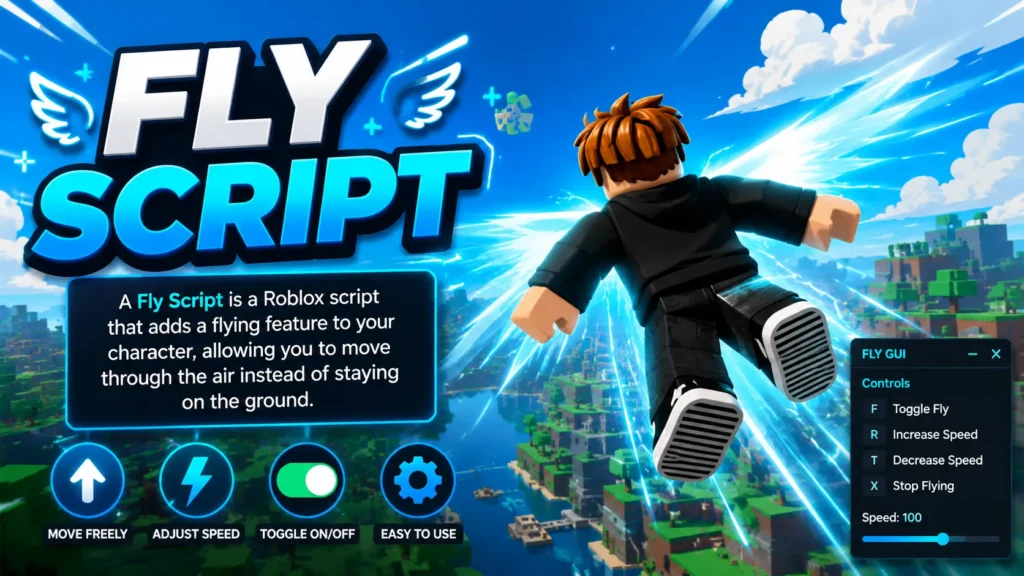
Moving around large Roblox maps can take time when players need to walk long distances, climb high areas, or follow paths to reach distant locations. This becomes especially noticeable when traveling across the map or repeatedly visiting elevated and hard-to-reach areas. A Fly Script can reduce travel time by allowing your character to move through the air instead of following normal ground routes. Flying can make it easier to reach high locations directly, cross open areas, and avoid long paths between distant locations.
What Is Fly Script?
Fly Script is a Roblox script that gives your character the ability to fly, letting you move through the air rather than staying on the ground. Depending on the script, you may be able to move in different directions, change your flight speed, and easily enable or disable flying. Different Fly Scripts can also have their own controls and interfaces based on their design. Some use a simple toggle, while others provide a GUI with additional movement and flight settings.
How Does a Fly Script Work in Roblox?
Fly Script changes how a Roblox character moves by adding controls for movement through the air. Once activated, the character can usually move upward, downward, forward, backward, or sideways instead of being limited to normal ground movement. How a Script works can vary depending on the script and the Roblox game where it is used. Some scripts provide basic flying, while others include speed controls, GUI options, and additional movement settings.
Best Fly Script
The best Fly Script depends on the features and controls you want for your Roblox gameplay. Some players prefer a simple, lightweight script, while others look for features such as a Fly GUI, adjustable flight speed, or a no-key setup. Before choosing a script, review its features and check whether it is compatible with the Roblox game you want to use it in. A Script that works well in one game may behave differently in another because each game can have its own movement systems and protections.
All Latest Fly Script
Mobile Fly / ESP / Bring Item
Bedwars Script Best NO KEY – Kill Aura, Fly, Auto Win, God Mode, Reach and More
Brookhaven RP Script Fly Hack
Brookhaven RP Script YHub – NoClip, Jump, Fly, Fling, ESP
RAGE HUB Script – Teleport, Fly, Kill Aura
SlixHub MM2 No Key, Fly, Jump Boost
Murder Mystery 2 Script NEW Best – NoClip, Fly, ESP, Farming, Trolling
Murder Mystery 2 Script GUI FourHub: ESP All, Aimbot All, Auto Farm, SpeedHack, Fly
Duck Hub Rivals – No Key, Auto Farm Level, Free Skin, Noclip, Fly
Best Script For Rivals Roblox (Zypherion) Antiban, Aimbot, Flymode, Noclip, Rayfield
Roblox Fly Script – OPHack, ESP, Infinite Keys, Max Level, Win Streaks
Cartola Hub Script Roube Um Brainrot – Speed Boost, Auto Steal, Fly
Moon Hub Auto-Lock Base, Auto Fly
Steal a Brainrot op Script: Fly, Speed, ESP
Steal a Brainrot Cheats – Fly, Noclip, Invisible, Speed, AntiSync
How to Use Fly Script?
Using a Script generally involves selecting a compatible script, loading it through a supported executor, and activating its flight controls. The exact process can vary depending on the script and executor you are using.
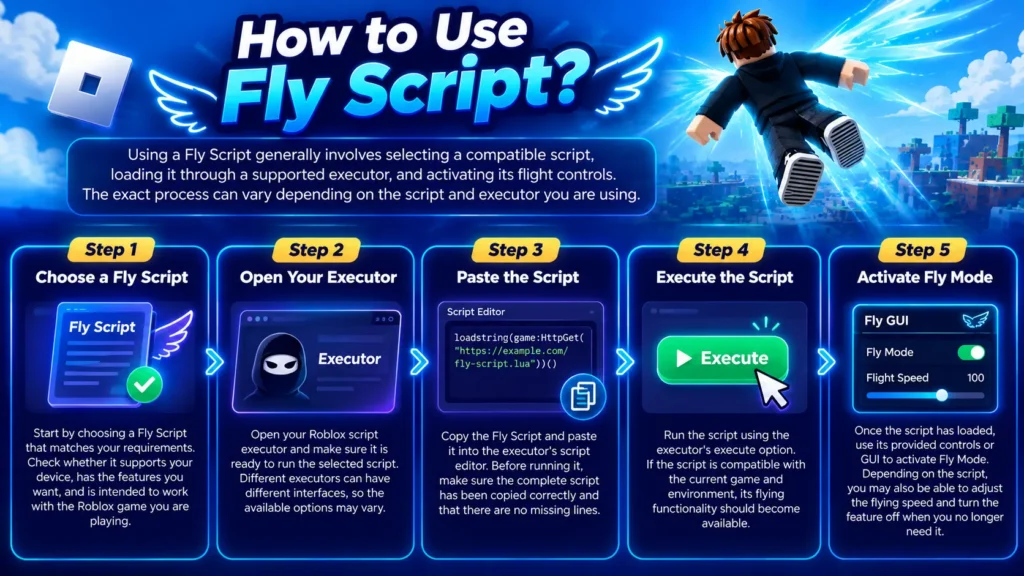
Step 1 – Choose a Fly Script
Start by choosing a Script that matches your requirements. Check whether it supports your device, has the features you want, and is intended to work with the Roblox game you are playing.
Step 2 – Open Your Executor
Open your Roblox script executor and make sure it is ready to run the selected script. Different executors can have different interfaces, so the available options may vary.
Step 3 – Paste the Script
Copy the Script and paste it into the executor’s script editor. Before running it, make sure the complete script has been copied correctly and that there are no missing lines.
Step 4 – Execute the Script
Run the script using the executor’s execute option. If the script is compatible with the current game and environment, its flying functionality should become available.
Step 5 – Activate Fly Mode
Once the script has loaded, use its provided controls or GUI to activate Fly Mode. Depending on the script, you may also be able to adjust the flying speed and turn the feature off when you no longer need it.
Fly Script Features
Different Fly Scripts offer different features, but most are designed to make flying and air movement easier to control. Available options can vary depending on the script, with some providing basic flight controls while others include additional settings for a smoother and more customizable flying experience.
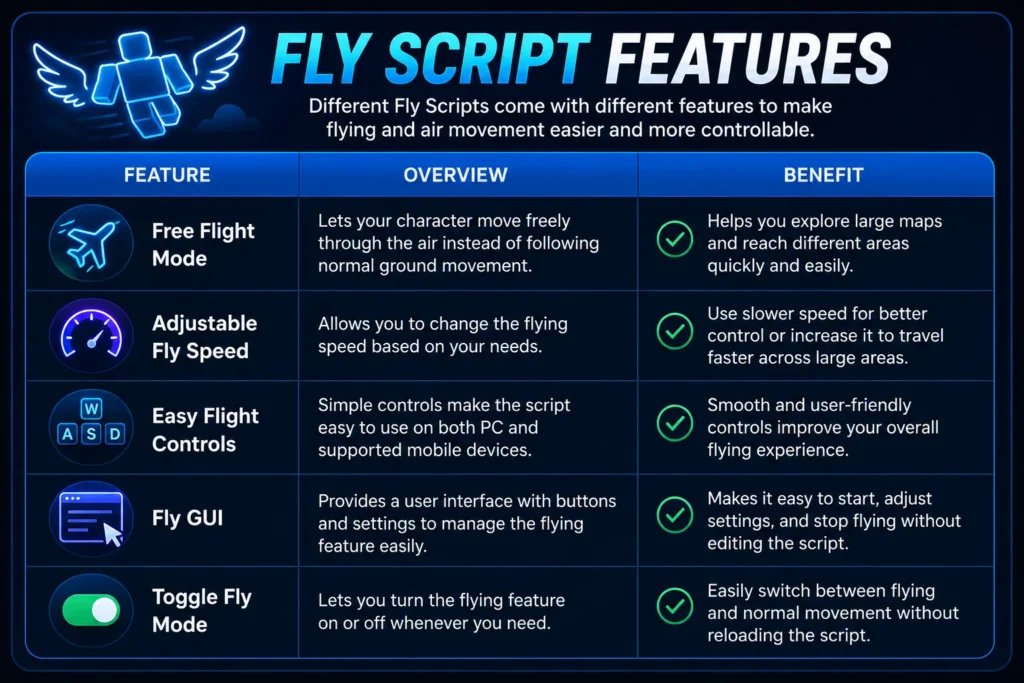
Free Flight Mode
Free Flight Mode lets your character move through the air instead of following normal ground movement. It can be useful when you want to explore large Roblox maps or reach different areas without taking longer ground routes.
Adjustable Fly Speed
Some Scripts allow you to change the flying speed based on your needs. You can use a slower speed when you need more control or increase it when traveling across large areas.
Easy Flight Controls
Simple controls make a Fly Script easier to use during gameplay. Depending on the script, you may be able to control movement with keyboard buttons on PC or touch controls on supported mobile devices.
Fly GUI
A Fly GUI gives you buttons and settings for controlling the flying feature. It can make things easier by letting you start flying, change settings, or turn the feature off without editing the script.
Toggle Fly Mode
Toggle Fly Mode lets you turn flying on or off whenever you need it. This makes it easier to switch back to normal character movement without having to reload the script.
Fly Script No Key
A Fly Script No Key is designed for users who want to use a flying script without completing a separate key verification process. Some key systems require users to visit external pages or complete additional steps before using a script. A no-key option keeps the setup simpler by removing these extra steps. However, script availability and compatibility can change over time, so always check the latest information before using one.
What Is a No Key Fly Script?
A No Key Fly Script is a flying script that does not require a key system to activate its main features. It can still provide common flying functions such as movement controls, adjustable speed settings, and a simple toggle option.
How to Use a Fly Script Without a Key?
If a Script is advertised as no-key, you generally do not need to complete a separate key verification step. You can copy the script, load it into a compatible executor, and follow the activation instructions provided with that specific script.
Fly Script for Mobile & PC
Fly Scripts can be available for both mobile and PC, but their controls may differ depending on the device. PC users typically rely on keyboard controls, while mobile players may use touch buttons or a GUI designed for smaller screens. Before using a Fly Script, check whether it supports your device and provides controls that are easy to use. A script designed for PC may not work properly on mobile, and the same can apply to scripts created specifically for mobile.
Is Fly Script Safe to Use?
Third-party Roblox scripts can involve risks, especially when downloaded from unknown websites or used with unofficial software. A Fly Script may also stop working after a Roblox update or changes to the game. For this reason, avoid running unknown code without checking it first, and be cautious with websites that request unnecessary downloads, account details, or personal information. Keep in mind that third-party scripts may also violate Roblox’s rules and could result in account restrictions.
Frequently Asked Questions
What is a Fly Script?
A Fly Script is a Roblox script that adds flying or aerial movement to a character. Depending on the version, it may also include features such as adjustable flight speed, movement controls, and a GUI for managing different flight options.
Is there a fly script with no key?
Yes, some Fly Scripts are available without a key system. These versions allow users to access the flying feature without completing a separate key verification process or additional activation steps.
Does Fly Script work on mobile?
Some Fly Scripts support mobile devices, but compatibility depends on the specific script and the environment where it is used. Mobile versions may also have different controls compared with PC versions.
Does the Fly Script work on every game?
No. A Fly Script is not guaranteed to work in every Roblox game. Different games may have their own movement systems and protections, which can affect how third-party scripts function and whether specific flying features work as expected.
Can I change the flying speed?
Some Fly Scripts include adjustable speed settings, while simpler versions may use a fixed movement speed. Check the features of the specific script to determine whether its flight speed can be changed.
Do I need an executor to use a Fly Script?
Most third-party Roblox scripts require a compatible script-execution environment to run. The exact requirements can vary depending on the script, executor, and platform you are using.
Conclusion
Fly Script is a popular choice for Roblox players who want an easier way to move through the game world. Features such as free flight, adjustable speed, simple controls, Fly GUI, and no-key access can make different scripts useful for various needs. Before using any third-party script, check its compatibility and understand the risks and rules related to your Roblox account. It is also better to choose a well-documented script and avoid suspicious downloads or websites.